The new kulibri

A lot has happened in the new kulibri. The character you like about kulibri has stayed: the basic ideas and rules are the same, we extended and improved them rather than turning them upside down. If you know kulibri, you will find your way around at once. All polls, replies and links are there and keep working.

The six biggest changes

Even large polls stay fast

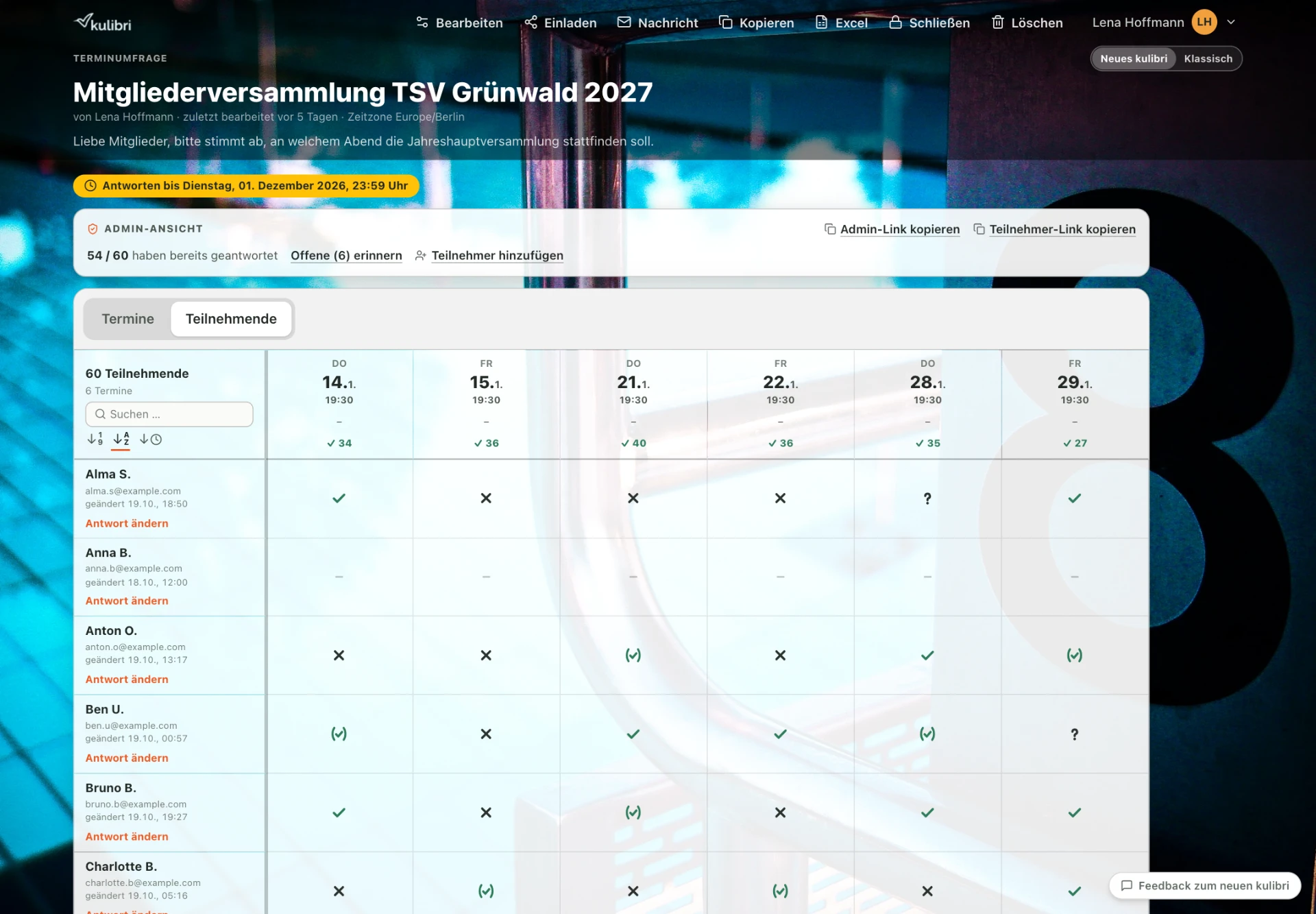
A hundred participants and a hundred dates are no problem any more. The grid loads quickly, scrolls smoothly and uses the full width when there are only a few dates. If you used to reach for a spreadsheet beyond a certain size: give it another try.

Large poll with 60 participants

The course planner

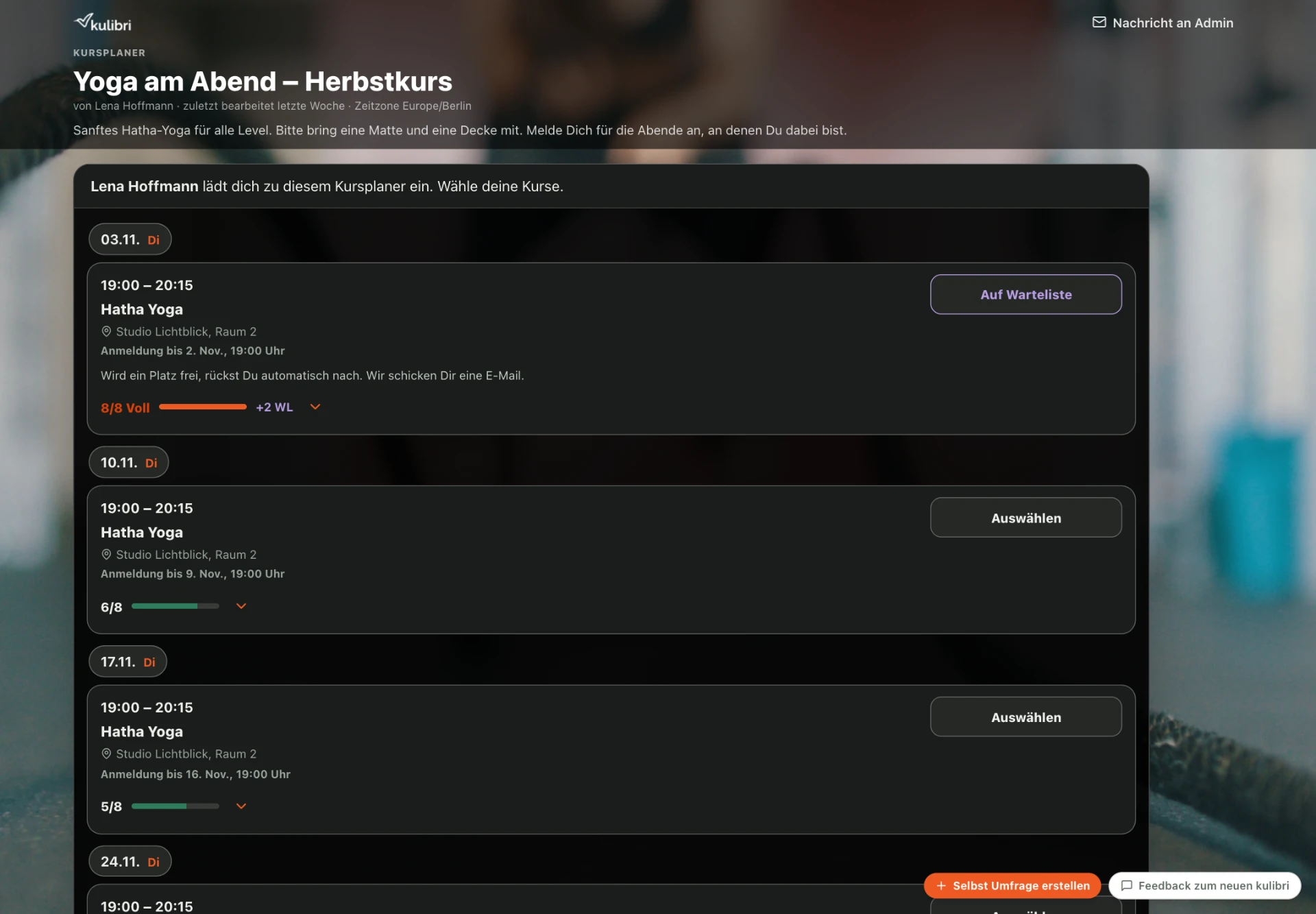
For courses, workshops and anything with limited places. Participants sign up for dates and see where places are still free. If a date is full, they join the waiting list and move up automatically as soon as someone cancels — they hear about it by email and can hand the place back with one click. Plus a sign-up deadline per date, for example up to 48 hours before the start. Cancelling is always possible, even after the deadline.

Course planner: yoga course with places, waiting list and sign-up deadline

The bring list

For the summer party, kindergarten celebration or club outing. You set what is needed, and everyone enters what they bring or take on — also in quantities such as “3 bottles”. That way you see at a glance what is still missing, and not everyone brings a cake.

Replies for several people

Whether for your own children or for older relatives: replying for several people has been rebuilt from scratch — on the phone as well as on the computer. Replying on the go has also become clearer in other ways: “Cancel” and “Send” stay fixed at the bottom edge, only the page scrolls, and while someone is replying nothing distracts them.

Three views of your poll

The grid, the list by dates and the list by participants. For a course, the date list shows the confirmations, the waiting list and the requests for every date together — and you switch back to the overall view with one click.

Everyone has their own access, even without an account

After replying, everyone gets a personal link and uses it to change their replies on any device. If someone signs up with an email address that has already replied in the poll, we first send a code to that address. That way nobody can overwrite other people's replies.

What else has changed

Planning and creating

  • Options without a date in the date poll, such as “None of these dates suit me”. They appear after the dates and are marked “No date”.
  • Every option can have a link, for example to the hotel or product, and you put the options in the order you want with arrows.
  • When creating, you copy dates onto exactly the days you need.
  • The guest list has date, time and place — from start to end, and your guests see it right in the invitation.
  • If your event has a date, your guests add it to their calendar with one click: as a file for Apple Calendar and Outlook, or directly to Google Calendar and Outlook on the web.
  • You can ask for first and last name separately. The list is then neatly sorted by last name, also in the Excel export.
  • Descriptions can be formatted: bold, italic, underlined, as a list and with links.
  • Each type of poll shows only what it needs. The guest list is now a slim form.
  • Small help icons explain settings where you need them.

Keeping an overview

  • An admin bar at the top of the poll shows you that you are in admin mode and has the most important actions at hand.
  • Other people's replies appear without you having to reload the page.
  • You sort participants by any column, by name or by who changed something last. Type a name and the grid shows only the matching rows.
  • You show or hide past dates with a switch.
  • On the dashboard you choose whether your projects appear as a list or as tiles.

Replying

  • One column per date, with large buttons and easy-to-read symbols.
  • In date polls and general polls you can also sign up without a reply. Before sending, kulibri tells you what that means. As an admin you see from the envelope who has already opened their personal link.
  • Full dates stand out immediately: their date is highlighted in green, and the grid shows “Full 2/2”. No more confirmations can be given for full dates, not even as an admin.
  • If you like, you see the confirmations for a date in the order they arrived, with date and time. Anyone who cancels and confirms again goes to the back of the line.

Sharing and managing

  • Copy the link, show the QR code or invite by email — all in one place.
  • Automatic reminders before the reply deadline.
  • You manage your billing details yourself: name, company or club, address and VAT ID in your profile. The next invoice is issued to them.
  • Feedback straight from kulibri — tell us what you notice with one click.

What has stayed the same

Your polls, replies and participants are there unchanged. Personal links, invitation links and admin links keep working — including the ones that have already been sent.

You edit your poll as usual directly in the preview and see every change immediately the way your participants see it. The background images are still there. Participants don't need an account, and kulibri stays ad-free, without tracking, with servers in Germany.

Questions about the switch

Do I have to do anything?
No. You sign in as before and land in the new kulibri. Your projects and all replies are there.
Do my old links still work?
Yes. Invitations, personal links and admin links that have already been sent keep working.
What do my participants see?
The view you chose for the project. Existing polls stay in the classic view until you switch them. New polls start in the new kulibri. Course planners, bring lists and polls with a waiting list exist only in the new kulibri.
Can I go back to the classic view?
During the transition, yes, for each project individually — in the project list or at the top of the settings. You always see your own projects in the new kulibri and can take a quick look at the classic view at the top of the poll page.
Do participants need an account?
No, never. They open the link and reply.

What does all this cost? Most of it is free, as always. What belongs to Premium and what Premium costs is on the pricing page.